Download

Showing posts with label download. Show all posts

Monday, August 13, 2012

How to open notepad with a bat file?

ကဲ။ လုပ္နည္းကေတာ့ ရိုးရိုးရွင္းရွင္းပါပဲေလ။ bat နဲ႔ save လုပ္နည္းကို ဒီမွာ တင္ထားပါတယ္။ [How to save and create the bat file?]

ကြ်န္ေတာ္လည္းပိုစ့္မေရးတာၾကာပါျပီ။ မအားလို႔နဲ႔ကြန္နက္ရွင္က်ေနတာနဲ႔ပဲေလ။ ခုေတာ့ bat file အပ်င္းေျပေပါ့။ အသံုးမ၀င္ေပမယ့္ အေျခခံအခ်ိဳ႔ေလးေတြကိုျပပါ့မယ္။ ခုေျပာမွာက Notepad ကို bat file ေလးနဲ႔ဘယ္လုိဖြင့္မလဲဆုိတာေပါ့။

ကဲဗ်ာ။အဲ့ကုဒ္ကိုကူး .bat ဖိုင္extension နဲ႔save လုပ္ပါ။ ျပီးေတာ့ notepad.bat နဲ႔ Save လုပ္ပါ။ notepad.bat နဲ႔ save မလုပ္ခ်င္လည္း တျခားဖိုင္နဲ႔လုပ္လို႔ရပါတယ္။ ဒါေပမယ့္ .bat ေတာ့မက်န္ခဲ့ပါနဲ႔....က်န္ခဲ့ရင္အလုပ္မလုပ္ေတာ့လို႔ပါ။

ခုဒါကေတာ့ WindowsXP/Vista/7 အတြက္ပါ။ ကြ်န္ေတာ့္စက္က Windows XP ပါ။ ထိုစက္ကိုင္သူမ်ားကေတာ့ေအာက္ပါအတုိင္းကူးေစခ်င္လိုပါတယ္။
%SystemRoot%\System32\NOTEPAD.EXE%1

Windows 95/95/ME တို႔သံုးတဲ့ User ေတြက ေအာက္ပါအတိုင္းကူးပါ။
%SystemRoot%\System\NOTEPAD.EXE%1

ျပီးရင္ဖြင့္ခ်လိုက္ပါ။ Click ႏွစ္ခ်က္လုပ္ေပးပါ။ ဒါဆိုရင္ျပီးပါျပီ။ ဒါက ကစားခန္းေလးေပါ့။ ကြ်န္ေတာ္ကလိလိုက္ရင္း သူငယ္ခ်င္းတို႔အတြက္တင္ေပးစရာအပ်င္းေျပျဖစ္သြားပါတယ္။ :D

Virus မရွိပါ။ ကြ်န္ေတာ္ေပးေသာ bat file ကိုဖြင့္ျပီးလွ်င္ Notepad က်လာမည္ျဖစ္ျပီး ထိုဖိုင္မွာ Command Prompt နဲ႔ တက္လာျပီး ပိတ္သြားမွာျဖစ္ပါတယ္။ ျပီးမွ Notepad တက္လာပါလိမ့္မယ္။

အဲ့ကုဒ္ကိုမေရးတတ္လွ်င္

ကြ်န္ေတာ္ေပးတဲ့ဖုိင္ကို Download ယူလိုက္ပါ။


အဆင္ေျပပါေစ။ ကြ်န္ေတာ္အားရင္ ကလိထားတာေတြေျပာျပဦးမယ္။ အကိုတို႔၊အစ္မတို႔ေရ။

သရဲေလး
[08/13/2012]

Friday, July 27, 2012

Register Internet Download Manager free[Crack only]


In this tutorial I am going to explain a way to crack Internet Download manager. This crack works with any version of IDM. In my last post i have explained a manual way of inserting registration key, but many of you are getting problem in doing so, so i am here with a very easy procedure to get IDM free.

Internet Download Manager(also known as Idman) is an excellent internet download accelerator that will care of all your downloads from the moment you install it on your PC.
If you want to increase download speed, this tool can help you to increase download speeds by up to 5 times, resume and schedule downloads.
High speed internet connections are common these days, Even if you have the fastest router in the neighborhood, take a look at Internet Download Manager , because it really has a lot to offer.


Download Internet Download Manager 6.11 Build 7

How to Crack/ register IDM:
1. Download and install free trial of IDM.


2. Now download crack from here, and run downloaded file 'Keypatch.exe'
3. Now Click 'Patch Server Check', then it will ask for exe file of IDM, so go to C:\Program Files\Internet Download Manager and then select IDMan.exe and press open. (Note: Make sure all opened IDM instances are closed before doing this.)
If you finish this step correctly, then it will show a 'success message' under Kill Server check.


4. Now your IDM is registered by default with a key, but if you want to register it with your name then first you need to clear previous registration information from IDM. For that press button clear previous registration data.


5.Now open IDM > press yes if it ask you to register IDM > Enter your name, mail id etc. > In Serial key field enter the serial key generated by crack. and press ok.


6. Now you have registered IDM successfully, you can check the registration details from Help > About IDM. 

IDM 6.xx Crack Download

Password to unlock the file:

Please leave u r comment in FAQs , if u r in trouble.

ref; http://kyawza01.blogspot.com/2012/07/register-internet-download-manager.html

GHOSTSCAPE


Game description:
Capture evidence of ghosts and escape the house...
Game controls: Use mouse to interact.
Warning: This game includes adult contents and scary movements.
Under 18 must have P.G. [Parental Guidance - click here!]

Password to unlock the file:

It's not swf file game. So u can open it easily. Download. It has 5MB. Enjoy! No virus and spam contains in this file.


www.kyawza01.blogspot.com

How to register Internet Download Manager?[Keygen+Serials]

Internet Download Manager(also known as Idman) is an excellent internet download accelerator that will care of all your downloads from the moment you install it on your PC.
If you want to increase download speed, this tool can help you to increase download speeds by up to 5 times, resume and schedule downloads.
High speed internet connections are common these days, Even if you have the fastest router in the neighborhood, take a look at Internet Download Manager , because it really has a lot to offer.

Download Internet Download Manager 6.11 Build 7


Internet Download manager is not available for free of cost. But here are the serial key of IDM by that u can register is for free.

Click Download to get more serials!

First name : Arkar
Last Name :Kyaw Za
Email : kyawza01@gmail.com
Serial:

How to  Register IDM:


1. First of all Disconnect internet
2. Now go to C:/Windows/System32/Drivers/Etc and open hosts file with notepad... and save after adding following lines in last


127.0.0.1 http://internetdownloadmanager.com
127.0.0.1 www.internetdownloadmanager.com


3. Now install the appliaction or if u have previously installed then go to step 4
4. Now enter registration keys

Note: Never Update ur IDM after registering using this key.

5. Now go to Windows Firewall > inbound rule > new > Choose Custom in Rule Type > Enter Next > Now in Program give the path of ur IDM's exe file in this program path > Enter next till you are on Action > now choose Block the connection > next > next > now give name and save it.

6. Finish, Now you will not get any fake serial message ever.


Password to unlock the file:

Please leave u r comment in FAQs , if u r in trouble.

Sunday, June 17, 2012

Ddos Hacking Tools (to attack Rohingya)


 http://adf.ly/9ngqi တြင္ download ယူႏိုင္ပါတယ္။ anti-virus ပိတ္ေပးထားပါ။ www.101dotnet.co.cc ကေတာ့ အင္တာနက္ပါ။ တစ္ေနကုန္ဖြင့္ျပီးတိုက္ပါ။ အျပင္ထြက္ျပီးစက္ဖြင့္ပါ။ အဲ့ broswer ေတြ၊ ေဆာ့၀္လ္ေတြကိုမပိတ္ပါနဲ႔။ ရိုဟင္ဂ်ာ ကိုအလိုမရွိလွ်င္လုပ္ႏိုင္ပါတယ္ဗ်ာ။

အဆင္ေျပၾကပါေစ။

သရဲေလး
(www.tayelay.co.cc)
<06/17/2012>

Thursday, May 31, 2012

Command Prompt 1.0 (Portable Download)

ကြ်န္ေတာ္လည္းမကိုင္ရက္ပိုင္းေလးရွိျပီ။ ေနာက္လည္းေရးျဖစ္မယ္ေတာ့မထင္ပါဘူး။

တစ္ခ်ိဳ႔အင္တာနက္ဆိုင္၊ ေက်ာင္းေတြမွာပိတ္ထားတတ္ပါတယ္။ Command Prompt ပါ။ အဲ့ေကာင္က ကြန္ပ်ဴတာဆရာၾကီးေတြသံုးတယ္ဗ်။ သားသားမပါဘူး။ ဟီး။ ကဲ။ ခုေ၀မွ်လိုက္ပါတယ္။ သိပ္ေတာ့မျပည့္စံုေပမယ့္ ကိုယ္လိုခ်င္တဲ့ Command ေတာ့ရတာေပါ့။

ေအာက္က Download ေလးကို click ပါ။

ဒီေနရာမွာ Download လုပ္ပါ။ ကြ်န္ေတာ္ခုတင္ထားတာက Portable ပါ။

File Size: 206.448 KB  
Version: 1.0

အဲ့ဗ်ာ။ေျပာရင္းဆိုရင္းနဲ႔ေမ့ေတာ့မယ္။ Password ေပးလိုက္မယ္ေနာ္။ စိတ္ခ်လက္ခ်သာသံုးပါေတာ့။

Password to unlock the file:


အဆင္ေျပၾကပါေစ။


သရဲေလး
[05/31/2012]

Friday, May 25, 2012

Notepad++v6.1.2(Portable+Installer)

 ဒါက ဟတ္ကာေတြ deface ေရးရင္လုပ္တဲ့လက္စြဲပါ။ ကိုယ္တိုင္သံုးၾကည့္ရင္ေတာ့သိမွာပါ။ သူမ်ားေတြေတာင္းဆိုလို႔ ခုလိုေ၀မွ်တာပါ။ ကြ်န္ေတာ္သည္ဟတ္ကာမဟုတ္ပါ။ ဟတ္ကင္းအေၾကာင္းမေမးပါနဲ႔။ ကြ်န္ေတာ္က သူမ်ားကိုကိုယ္ခ်င္းစာနာတတ္ပါတယ္။ ဒါေၾကာင့္ သူမ်ားကိုထိခိုက္မယ့္အရာေတြမတင္ေပးပါ။ virus မရွိပါဘူးလို႔အာမခံပါတယ္။

ဒီမွာ download ဆြဲလိုက္ပါ။ Portable ပါ။

File Size: 4.48 MB
Version: 6.1.2
Password to unlock the file:


ဒီမွာ download ယူလိုက္ပါ။ Installer ပါ။အရမ္းအသံုး၀င္ပါတယ္။ လိုခ်င္ရင္ အစိမ္းေရာင္ Download button ကိုအသံုးျပဳပါ။ : )


File Size: 5.43 MB
Version : 6.1.2
Password to unlock the file:


အဆင္ေျပၾကပါေစ။ white hacker ေကာင္းမ်ားျဖစ္ၾကပါေစ။


သရဲေလး
[05/26/2012]

Thursday, May 24, 2012

Getting co.cc working with devhub site (Free E-book Download)


ကြ်န္ေတာ္လည္းပိုစ့္မေရးတာၾကာပါျပီ။ ခုေတာ့ ပိုစ့္အျဖစ္တင္လို႔မရတာေတာ့ဟုတ္ပါတယ္။  မ်ားလို႔ပါ။ ဟီး။ ကြ်န္ေတာ္အရင္ကျဖစ္ခ်င္ေနတဲ့ co.cc ပါ။ စာအုပ္အျဖစ္ခ်ဳပ္ျပီးတင္ထားပါတယ္။ Online မွာဖတ္ခ်င္ရင္ ဒီေနရာ မွာ ၀င္ဖတ္ႏိုင္ပါတယ္။ အဲ့ Online E-book ကိုSave လုပ္ခ်င္ရင္လည္း Save လုပ္နည္းက ဒီမွာ ဖတ္ႏုိင္ပါတယ္။ [How can I save PDF files?] ။ ဒီ E-book ကိုအစကေတာ့ အဂၤလိပ္လိုေရးမလို႔ပါ။ အမွန္ေတာ့ Google မွာရွာတာ လံုး၀မေတြ႔ပါ။ အတိအက် အမွန္အကန္မေတြ႔ပါ။ ထို႔ေၾကာင့္လူသိေအာင္ကြ်န္ေတာ္တင္ရျခင္းျဖစ္ပါတယ္။ ေနာင္လည္း ကိုယ္ပိုင္ E-book ေရးမွာပါ။ E-book ကိုအျပင္မွာေရာင္းမွာျဖစ္ပါတယ္ဗ်ာ။


Download Link : [Click Here] 4shared.com
File Size : 399 KB


Password to unlock the file:

အကယ္လို႔လင့္အလုပ္မလုပ္ရင္လည္း www.tayelay.co.cc ရဲ႔ Cbox (သို႔မဟုတ္) ေအာက္က Comment Box မွာေျပာႏုိင္ပါတယ္။ Password ကအဲ့ Password ပါ။ ေမွ်ာ္။

အဆင္ေျပပါေစ။
   
သရဲေလး
[05/25/2012]

Tuesday, May 15, 2012

မွားဖ်က္မိတာေတြ ျပန္ယူဖို႔ ( Recuva )

Full Version Recovery Software ေတြ ရွိေပမယ့္ ဒီ Free သံုးလို႔ ရတဲ့ Recuva Recovery ၀ဲေလး နဲ႔ ကိုယ္တုိ႔ မွားဖ်က္မိတဲ့ File ေတြ ၊ Folder ေတြကို ျပန္ၿပီးေတာ့ Recovery လုပ္ႏုိင္ပါတယ္ ..။ အားလံုး ရတယ္ မရတယ္ ဆုိတာထက္ အတုိင္းအတာ တစ္ခု ထိေတာ့ ျပန္ရမယ္လုိ႔ ထင္ပါတယ္...။ သံုးၾကည့္ခ်င္ရင္ေတာ့


ဒီမွာ ယူလုိက္ပါ

သူ႔ရဲ႕ Procedure ေလးကေတာ့

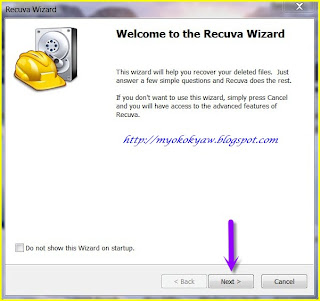
1. သူ႔ရဲ႕ Shortcut Icon ေလးကို Click ႏွိပ္လုိက္ပါ။ပီးလွ်င္ Next ကိုႏွိပ္ပါ။


2. ကို Recover လုပ္ခ်င္တဲ့ File Type အမ်ိဳးအစား ေရြးပါ။


3. ကိုျပန္ပီး Recover လုပ္ခ်င္တဲ့ ေနရာကို ေရြးေပးပါ။


4. Enable Deep Scan ကိုႏွိပ္ပီး Start ကိုနွိပ္ပါ။


5. ဒါဆိုရင္ေတာ့ သူက Scan ဖတ္ေပးေနမွာပါ။


6 .ေနာက္ဆံုးေတာ့ သူရွာေတြ႕တာေတြကို ျပတဲ့ အခါ Recover ကိုႏွိပ္ေပးပီး ကိုထားခ်င္တဲ့ ေနရာေလး ေရြးေပးလုိက္ရုံပါ။


အားလံုးအဆင္ေျပၾကပါေစ

Sunday, May 6, 2012

Gtalk တြင္ idle ထည့္မယ္

ကြ်န္ေတာ္လည္းပိုစ့္မေရးတာၾကာပါျပီ။ တစ္ခုေလာက္ေတာ့ေရးၾကည့္တာေပါ့။

idle ကလူအသိမ်ားပါတယ္။ သူမ်ားေတြက ေတာင္းဆိုေနလို႔ ေပးလိုက္တာပါ။ ဖိုင္ကေပါ့ေပါ့ပါးပါးပါ။ ဒါေပမယ့္ Google က exe ဖိုင္တန္းေဒါင္းျပီး အတုေတြေပးတာေတြ ကြ်န္ေတာ္ေတြ႔ပါတယ္။ virus ပါတဲ့ဟာေတြလည္းေပးေနတတ္လို႔ ကြ်န္ေတာ္အရင္ကတည္းက ရွိတဲ့ဟာကို ျပန္လည္ေ၀မွ်လိုက္ပါတယ္။ www.galwaysidle.com မွွာ အရင္ကူးလို႔ရပါတယ္။ ၂၀၀၉အထိေပါ့။ ျမန္မာအိုင္ပီနဲ႔မရလုိ႔ခက္ခဲေနၾကပါတယ္။ အရင္ ဗားရွင္းေတြဆိုရင္ gtalk ကို restart ခ်ေလ့ရွိပါတယ္။ ခုေတာ့မဟုတ္ဘူး။ ရေနပါျပီ။

ေအာက္ပါအတုိင္း Download ကို click ပါ။ install လုပ္ပါ။ idle ကို gtalk မွာရပါလိမ့္မယ္။


အဆင္ေျပပါေစ။

သရဲေလး
(05/07/2012)

Friday, April 27, 2012

About Blank ကိုကာကြယ္နည္း

ကဲဗ်ာ။ သရဲေလးပိုစ့္ကိုမ်ဴးမ်ဴးဖတ္ခ်င္ၾကတယ္ေပါ့။ ဟဲဟဲ။ မလိုပါဘူး။ မေရးတာၾကာျပီ။ ေတာင္းပန္ပါတယ္ဗ်ာ။ about:blank ကလည္း ရွုပ္တယ္လို႔မထင္ဘူးလားဗ်ာ။ အလွပံုစံနဲ႔။ ျပေနတာ မ်က္စိေတာ့ေနာက္ပါေပတယ္။ ေဖ်ာက္မယ္ဆိုေတာ့လည္း address bar ထဲမွာ ဥပမာ - www.tayelay.co.cc ထည့္လိုက္ရင္လည္းမဟုတ္ျပန္။ tab တစ္ခုဖြင့္ရင္လည္း အဲ့လိုတက္လာေတာ့ရွုပ္ပါတယ္။ ကြ်န္ေတာ္အရင္က Internet Explorer ကိုင္ပါတယ္။ အရင္က Mozilla Firefox ေတာင္နာမည္မၾကီးေသးေတာ့ ကြ်န္ေတာ္အဲ့အခ်ိန္က နည္းပညာရွင္ရွားပါးလွတဲ့အခ်ိန္ျဖစ္ခဲ့ပါတယ္။ အရမ္းလည္းခက္ခဲပါတယ္။ ကြ်န္ေတာ္အင္တာနက္စကိုင္ခါစဆိုေတာ့ သူမ်ားလုပ္ရင္ခံရတာ ခဏခဏပါပဲဗ်ာ။ ခုထိေပါ့(သရဲေလး အကာအကြယ္ညံ့လို႔ပါလို႔ေျပာရမွာေပါ့ :P )။ ကဲကဲ။ လိုရင္းေတာာင္မေရာက္ေတာ့ဘူး။ ခုေျပာမယ္။

about:blank က hijack ပံုစံမ်ိဳးေပါ့။ ေသခ်ာၾကည့္ပါ။


about: blank က geek ဘာသာစကားကဆင္းသက္လာတာပါ။ အဓိပၸါယ္ကိုျပန္ရင္ေတာ့ hijacked ေပါ့။ လွတယ္ဆိုေပမယ့္ ကိုယ့္စက္ကိုထိခိုက္ပါတယ္ဗ်ာ။ အဲ့ဒီေတာ့ ျဖဳတ္မယ့္နည္းေတြေပၚလာရမွာေပါ့ဗ်ာ။ ေနာက္ဆုိရင္ ရွိမွာမဟုတ္ေတာ့ပါဘူး။

ကဲ။ ျဖဳတ္ခ်င္တယ္ဆိုရင္ ေအာက္ပါအတုိင္း download လုပ္ပါ။ mirror က 4shared ပါ။


၁။ XoftSpy ကိုယူပါ။ အေပၚက Download Now ကို click လိုက္ေပါ့။
၂။ ကြ်န္ေတာ္ေပးေသာေဆာ့၀္လ္နဲ႔ Scan ဖတ္ပါ။ ျပီးေတာ့ virus ေတြ၊ infections ေတြ၊ alert ျပလာရင္ဖ်က္လိုက္ပါ။
၃။ ထံုးစံအတုိင္း ကြန္ပ်ဴတာကို Restart ခ်ပါ။
၄။ ကဲေနာက္ထပ္ရွာခ်င္တာရွာကဲေပါ့။ ကဲကဲ။ အိုေကျပီလို႔ထင္ပါတယ္။ about:blank လည္းေပ်ာက္ျပီေပါ့။

ဒါဆိုရင္ဘယ္ browser ပဲယူယူ၊ ဒါလိုမ်ိဳးၾကီးကိုေတာ့မေတြ႔ရေတာ့ဘူး။

အဆင္ေျပၾကပါေစ။

သရဲေလး
<04/27/2012>


Friday, April 20, 2012

Recycle Bin ကို တျခားနာမည္နဲ႔ Rename လုပ္ရေအာင္(၂)


http://adf.ly/7cyx6 က tag ေလ။ ခုဟာက ၃ခုေတာင္ျပင္လုိ႔ရပါတယ္ ။ဖိုင္ကေပါ့ေပါ့ေလးေလ။ နဂိုအတိုင္းလည္းထားလို႔ရပါတယ္။ Recycle Bin | My Computer| My Network Places | My Documents သံုးခုက ထံုးစံျပင္လုိ႔မရတာဟုတ္တယ္ဟုတ္။ သူက Windows XP မွာပဲျပင္လုိ႔ရတာပါ။ Vista ရမရမသိပါ။ Windows 7 မွာလံုး၀အလုပ္မလုပ္ပါဗ်ာ။


အဆင္ေျပပါေစ။


သရဲေလး
<04/20/2012>

Saturday, April 7, 2012

ဂိမ္းေတြရဲ႔ cheat စာအုပ္ေဆာ့၀္လ္ရယူရန္(Cheatbook Database 2012)


ကြ်န္ေတာ္မေရးတာနည္းနည္းၾကာျပီေပါ့ဗ်ာ။ ကြ်န္ေတာ္တို႔ဆီမွာ လိုင္းကလည္းေကြး...သားသားျမန္မာမွာေနေတာ့ မီးကလည္းပ်က္ေနတာ ...ပိုစ့္ေရးတာတန္းလန္း..ျပီးရင္မီးကဖတ္ဆိုျပီးပ်က္ေတာ့..ခဏခဏပိုစ့္ေရးရတာအရသာမရိွဘူးေပါ့ဗ်ာ။ 2012 cheat (for April) ကေနာက္မွတင္ထားလိုက္မယ္ဗ်ာ။

၁၉၉၈ကေန ၂၀၁၂ ထိပါတဲ့ games cheat ေတြပါဗ်ာ။ တခ်ိဳ႔က ဘယ္လိုေဆာ့ရမလဲဆိုတာကိုေသခ်ာ instruction မေပးထားလို႔ အဲ့ကေနဖတ္ရတာအဆင္ေျပတာေပါ့ဗ်ာ။လွည့္ကြက္ကေတြေပ့ါ။ (ဥပမာ-PC, Playstation, Playstation 2, Playstation 3, Sega, Nintendo 64, Nintendo DS, DVD, Gameboy Advance, Gameboy Color, N-Gage, Nintendo DS, XBox, XBox 360, iPhone, Gamecube, Dreamcast, Super Nintendo, Wii, Sony PSPေတြေလ)။ ျပီးေတာ့ game ထြက္လာတဲ့ခုႏွစ္ေတြကိုလည္းရွာလို႔ရတယ္။ အဲ့ဂိမ္းရ႔ဲ official site လည္းရွာလို႔ရတယ္ဗ်ာ။

exe နဲ႔ပါ။ ဖိုင္ဆိုဒ္ကတအားမ်ားလို႔ upload လုပ္ရတာအခ်ိန္ေပးရပါတယ္ဗ်ာ။ ေအာက္က Download Now-free ကို click ပါဗ်ာ။ (Link : 4shared)


60MB ေပါ့ဗ်ာ။ Installer သက္သက္ပါ။

official site: Cheatbook-Database2012

သရဲေလး
<07/04/2012>

Thursday, March 29, 2012

ပိတ္ထားေသာ ဖိုရမ္ဆုိဒ္မ်ားကိုေက်ာ္လႊားျခင္း (Educational Purpose Only)


ကြ်န္ေတာ္လည္းဖိုရမ္ဆိုရင္ Register လုပ္ၿပီး၀င္ရတာသိပ္ပ်င္းပါ့။ ကြန္က်ရင္ေတာ္ေတာ္ရွုပ္တယ္။ ေနာက္တစ္ခုက ကိုယ့္ကိုသူတို႔ကအဲ့ဖိုရမ္ဆုိဒ္က Banned ထားရင္ဘယ္ႏွယ့္လဲဗ်ာ။ ေအာက္လို႔လည္းမရ၊ နည္းရွာမရေတာ့ပိုဆိုးေပါ့။ Hacker ေတြကိုင္တဲ့tool နဲ႔ဆိုရင္ေတာ့အစဥ္အေၿပဆံုးေပါ့ဗ်ာ(သားသားမသိဘူးေနာ္။)။ ဒါေပမယ့္ အလြယ္ဆံုး လွည့္ကြက္နဲ႔အလုပ္လုပ္တာ ၃ခုရွိတယ္။ ခုေၿပာၿပမယ္ေလ။


၁။ Google Cache

ကဲကဲ။  Google ကိုသြား။ Search Engine မွာ ဥပမာ http://www.mmitpalace.com/forum/topics/6456788:Topic:46893 ေပါ့ေလ။ ခ်က္ခ်င္း Enter ေခါက္။


ၿပီးေတာ့ ေပၚလာလိမ့္မယ္။ ပံုမွာၿပတဲ့အတိုင္း Cached ကို click ပါ။
 ဒါကေတာ့ နဂိုအတိုင္း၀င္ရင္အဲ့လိုၿဖစ္မယ္။
 ဒီပံုက Cached လုပ္ထားတဲ့ပံု။ လွဳပ္ရွားမွဳကေတာ့ အေပၚမွာေရးထားတာေပါ့ (သို႔ေသာ္ ခုလွဳပ္ရွားမွဳနဲ႔မတူဘူးေပါ့ဗ်ာ။ ဟဲဟဲ)


 ၂။BugMeNot (Mozilla Firefox Extension)

BugMeNot Add-on ဟာ Bypass Registration အတြက္ အလြန္ေကာင္းတဲ့ Add-on ပါဗ်ာ။ BugMeNot မွာ ဆိုဒ္ ေတာ္ေတာ္မ်ားမ်ားရဲ႕ Login information မ်ားကိုသိမ္းဆည္းထားလို႔သိထားရပါတယ္ဗ်ာ။

ကို click လုိက္ပါ။

ဒီလိုလာၿပီးရင္ Allow ဆိုတာကိုေပၚလာပါလိမ့္မယ္။ အဲဒါကိုပါ Click လိုက္ပါ။


Install Now ကို Click ပါ။ ၿပီးရင္ Restart Firefox ကိုေတြ႔ရပါလိမ့္မယ္။။ အဲ့ဒါေလးကို Click လုိက္ပါ။

BugMeNot ကိုသြင္းျပီးျပီဆိုရင္...
 အေပၚကပံုေလးကိုေသခ်ာၾကည့္ပါဗ်ာ။
 about:addons ကို သြားပါ။
BugMeNot ရဲ႔ Options ကိုသြား။ ၿပီးတာနဲ႔ ရွိသမွ် Box ေတြကိုအမွန္ၿခစ္။ ၿပီးတာနဲ႔ OK ေပါ့ဗ်ာ။


၃။User Agent Switcher(Mozilla Firefox Extension)


User Agent Switcher က Webmasters ေတြ သူတို႔ရဲ႕ Websites ေတြဟာ Google ႏွင့္ တစ္ျခား Search Engines ေတြနဲ႔ ေကာင္းစြာ အလုပ္လုပ္ႏိုလား လို႔ စစ္ေဆးရာတြင္သံုးတာ ျဖစ္ပါတယ္။ သူ႔ကိုသံုးျပီး ေက်ာ္(Skip Registeration) ကိုစြမ္းေဆာင္ႏိုင္ပါတယ္ဗ်ာ။

 
 ကို Click လိုက္ပါ။

ဒီလိုလာၿပီးရင္ Allow ဆိုတာကိုေပၚလာပါလိမ့္မယ္။ အဲဒါကိုပါ Click လိုက္ပါ။

Install Now ကို Click ပါ။ ၿပီးရင္ Restart Firefox ကိုေတြ႔ရပါလိမ့္မယ္။။ အဲ့ဒါေလးကို Click လုိက္ပါ။
Tools ကိုသြား။ ၿပီးရင္ Default User Agent ကိုေထာက္လိုက္ပါ။ ၿပီးရင္ User Agent Switcher ကိုသြားပါဗ်ာ။ ေနာက္ဆံုး Options.... ေပါ့ဗ်ာ။

New ကို click ပါ။ ၿပီးတာနဲ႔ New User Agent... ကို click ပါ။


Description: crawl­66­249­66­1.googlebot.com
UserAgent:  


UserAgent ကေတာ့ blank (ဘာလာ) ေပါ့ဗ်ာ။ အဲ့မွာ နဂိုစာပါတယ္။ ဖ်က္လုိက္ပါ။

 ၿပီးရင္ OK ကို click ပါ။ User agent မွာ အသစ္လုပ္ထားတဲ့ Agent သံုးျပီး ပိတ္ထားတဲ့ဖိုရမ္ဆိုဒ္ေတြကိုၾကည့္လို႔ရပါၿပီဗ်ာ။

လက္ေတြေညာင္းသြားၿပီ။ သားသားနားေတာ့မယ္ေနာ္။ ေဆးအၿဖစ္၊ အလွဴအၿဖစ္ ေအာက္မွာကြန္မန္႔လိုက္ဦး။ သားသားကအမြဲသမားဆိုေတာ့ဗ်ာ။ ဘယ္လိုလဲ။ သရဲေလးကေတာ့ လက္သရမ္းေကာင္ပဲ။ အဟတ္ဟတ္။ အလြယ္ဆံုးပဲေနာ္။ SQL Injection ကေတာ့ မကိုင္တတ္လို႔ မတင္ေတာ့ဘူးေနာ္။ ဟိဟိ။ အဆင္ေၿပၾကပါေစ။။

သရဲေလး
<03/29/2012>

Share

Twitter Delicious Facebook Digg Stumbleupon Favorites More